Paulblish turns mermaid code blocks into diagrams, and until now it used mermaid.js to do it. It worked, but the diagrams always looked a bit off next to the rest of my site, and on a phone anything wide shrank into a tiny unreadable smudge.
Yesterday I found Pele, a Mermaid renderer from the Obsidian team, named after the goddess of volcanoes (a very cool name for a diagram library 🌋). You can probably guess what happened next:
flowchart LR
    found(Found Pele) --> swap(Swapped it out in one PR)
    swap --> nicer(Website is nicer!)
Why though?
- It's much smaller: about 230 kB gzipped with zero dependencies, versus 1.6 MB and 23 dependencies for mermaid.js.
- It's really customisable: everything is styled with CSS variables, so I mapped Pele's colours and fonts straight onto my site's palette instead of wrestling with a theme config.
- And it's from the Obsidian team. I write all of my articles in Obsidian, so it feels right that the diagrams come from the same people as the app I write them in.
Here's that size difference as a diagram, using a mermaid graph and pele:
xychart-beta
    title "Download size, gzipped (kB)"
    x-axis ["mermaid.js", "Pele"]
    y-axis "kB" 0 --> 1600
    bar [1600, 230]
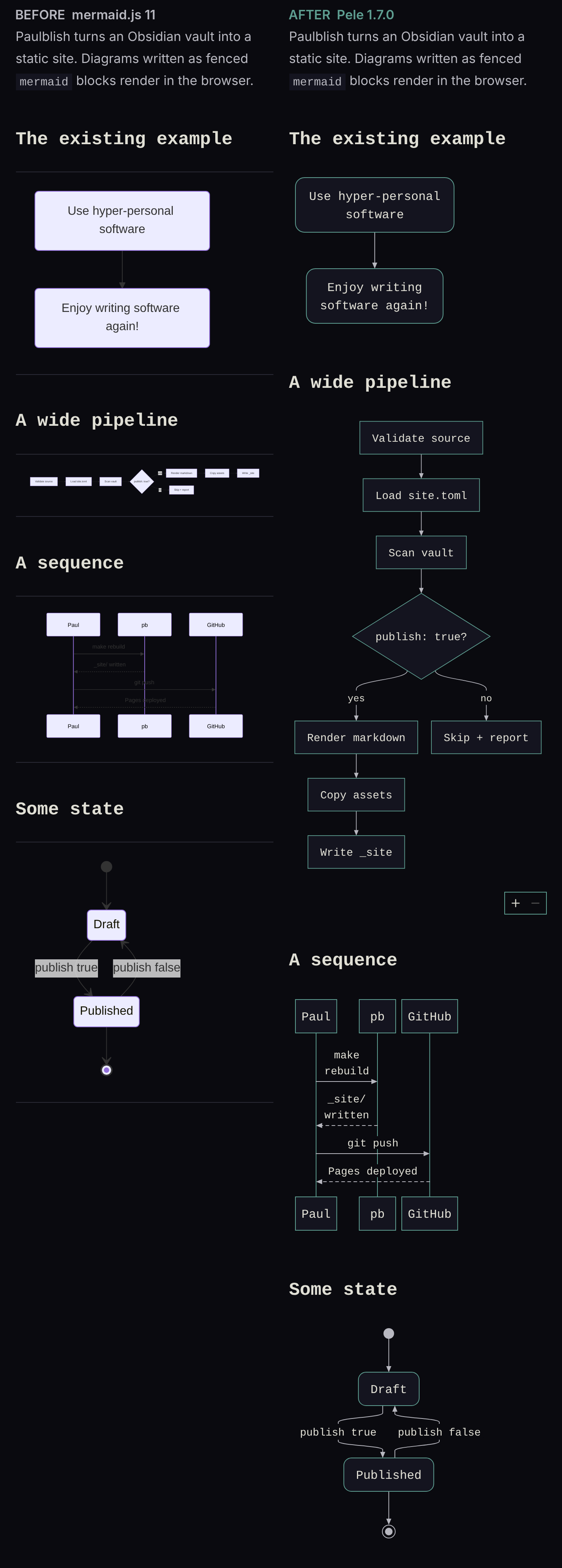
Here's the before (mermaid.js, left) and after (Pele, right). The diagrams finally pick up my site's dark background, teal borders and fonts, so they look like they belong here. The real win is on a phone though: mermaid.js shrinks a wide diagram until you need a magnifying glass, but Pele re-lays it out from left-to-right into top-to-bottom. Try the flowchart above on your phone and see!
Pele supports every diagram type built into Mermaid, so here's a mindmap of a few of them (drawn by Pele, of course). The whole change was one PR, and as always, fork away if you want it for your own site. 🌋
mindmap
  root((Pele))
    Charts
      Pie
      XY chart
      Quadrant
    Structure
      Flowchart
      Class
      Entity relationship
    Time
      Gantt
      Timeline
      Git graph