My terminal demos are real now
I build a lot of terminal tools.
I have paulrun to execute my runbooks, clientele to generate API clients, and there's a long tail of little CLI things that I have made too.
When I publish them, I always find that a README full of code blocks never quite shows what using them feels like, and so I like to add little animations of the tool running. Because CLI output is wicked, right?
The usual way to make one is a GIF, and GIFs are terrible for a few reasons: megabytes for a few seconds of text, blurry on any decent screen, and stale the moment you change how your CLI works. For example: Clientele's README had a GIF of a command that doesn't even exist any more, and I didn't realise until last week, oops!
So I built something to scratch my itch...
I built zoetty.
It generates CLI demo clips for you in either SVG or html/css format. A clip is defined in a toml file. It's not just a raw video.
Here's a demo of zoetty CLI, recorded using zoetty:
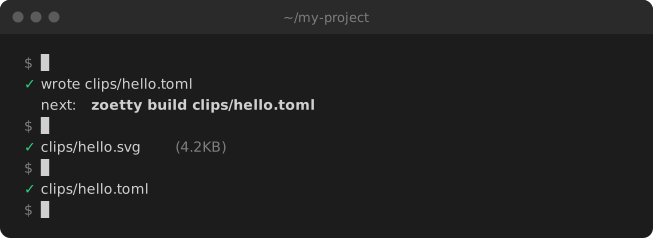
Note: I realise now the example above is a total mindfuck: it is an SVG generated by zoetty, showing how zoetty generated the clip itself, what! I guess it's a quine?
The toml file for the clip above looks like this:
# zoetty recording itself: init a clip, build it, check it.
title = "~/my-project"
label = "zoetty init writes a starter clip spec, zoetty build renders it to SVG, and zoetty check confirms it is up to date"
cols = 72
out = ["quickstart.svg", "quickstart.html"]

[[run]]
cmd = "zoetty init clips/hello.toml"
exec = "cd zoetty-quickstart && zoetty init clips/hello.toml"
output = "captures/quickstart-init.ansi"

[[run]]
cmd = "zoetty build clips/hello.toml"
exec = "cd zoetty-quickstart && zoetty build clips/hello.toml"
output = "captures/quickstart-build.ansi"

...
You can either hard code what is shown yourself, or run zoetty record to run real CLI commands and save what goes to stdout, colours and all.
Recording the output of a real command is defined like this:
# An interactive program: `input` is typed into it while recording,
# one line each time it goes quiet, so answers land after their prompts.
title = "python"
label = "A Python REPL importing zoetty's markup parser and parsing some styled text"
cols = 64
out = ["repl.svg", "repl.html"]

[record]
env = { PYTHON_BASIC_REPL = "1" }

[[run]]
cmd = "python -q"
output = "captures/repl.ansi"
input = """
from zoetty.markup import parse, plain
plain(parse("[bold]zoe[/]tty"))
[s.styles for s in parse("[bold green]ok[/] done")]
"""
pause = 0.2
Then you run zoetty build which turns that saved output into an animated SVG, or an HTML fragment with selectable text for a docs site. The clips are only a few KB of text instead of megabytes, and zoetty itself is pure Python with two dependencies (click and rich) so no ffmpeg, no headless browser, no Node.
The bit I really like is that the clip output lives in the repo, the "spec" toml file, the captured output, and the built clip are all just files. That means a clip can be checked to make sure it is consistent with the latest version of the CLI command.
In your CLI you can run zoetty check which will fail the second a clip stops matching.
Small tools or just get LLMs to do everything?
It also turns out this is a perfect tool for a coding agent: the spec is tiny, every command tells you what it did, and there's a page in the docs written for agents to follow, plus a prompt in the README you can paste straight into Claude Code or whatever you use. An LLM could do this for you itself, but this is a deterministic, tiny way to produce the same result, which can lead to you saving tokens and saving yourself from frustration.
Zoetty isn't trying to be everything: if you're recording a full-screen TUI, VHS is the better tool. But if you want a few CLI commands and their real output in a README that stays up to date, this is perfect. It's on PyPI (uv tool install zoetty), the docs are here, and the code is MIT licensed on GitHub, so as always, fork away ⚜️